Creating Cross Browser HTML5 Forms Now, Using modernizr, webforms2 and html5Widgets
July 27th, 2010 by zoltan · 23 Comments
Updates:
- Sept. 10, 2010: This webforms2 script in the link below has been modified to fix validation issues with the newer versions of Safari and Chrome.
- Aug. 6, 2010: This article has been translated into Korean.
- May 12, 2011: html5Widgets has been updated to support the
oninputevent.
- Ease the markup learning curve: HTML5 form widgets and validation have been built to be as dead simple to markup as a select box with no JavaScript knowledge required
- It’s a W3C standard: so you know that it’ll work for years to come and if you have problems, you could always ask almost anyone in the web development community for help.
- Cellular phone support: HTML5 form fields will have optimized user interfaces appropriate for the type of device. Blackberry already has optimized versions of the date/time and color widgets and, according to Mark Pilgrim’s article A Form of Madness, the virtual keyboards that appear when using HTML5 form fields are optimized for the data being input.
- Web development tools will have to support it: It’s a safe bet that Aptana, Dreamweaver, and all the other IDEs out there will have HTML5 support.
- It’s HTML5: when you tell your non-techie co-workers that you use it, you will be the envy of all — after all, it must be five times better than regular HTML, right? Your boss will be so impressed that you are now a guru in this futuristic technology with a cool numbered acronym that he or she will give you a big fat raise!!! (Okay, okay. Don’t try to laugh too hard … your co-workers will start to worry).
The Support Dilemma
Unfortunately, today’s support for the HTML5 Form Module is spotty with each browser supporting different parts of the specification. Take a look at Wikipedia’s HTML5 Forms comparison chart. You’ll see each browser supporting a different set of features, but the lowest common denominator they all support is rather small.But I Want To Use It Now!!!
HTML5 Forms started off as WebForms 2.0 back in 2004, so I wasn’t surprised to see that a few developers had already coded some JavaScript implementations. Weston Ruter’s cross browser library,webforms2.js, implements a huge chunk of it, including parts that didn’t make the transition from WebForms 2.0 to HTML5 forms (e.g. Webform 2.0′s Repetition Model).Since widgets weren’t implemented in
webforms2, I created html5Widgets.js. This interface library is independent of webforms2 – if all you want is a cross-browser HTML5 form with validation, then all you need is the original webforms2.js. If you want special widgets that are not available for all browsers, include html5Widgets.js. Since I did not want to re-invent the wheel by creating widgets from scratch, html5Widgets.js uses some really nice third party JavaScript libraries to create them (more on that below). It also uses Modernizr to detect if there is native support for each of the HTML5 form widgets – if not, html5Widgets
steps in to put the right widget in place. To save bandwidth,
developers only need to include the third party libraries for the
widgets they need.In the rest of this article, I will go over different parts of the HTML5 specification and show how you can use them in your applications today, step-by-step. Each section will state which browser natively supports that part of the specification, and what is needed for browsers that don’t. Eventually, when the browser manufacturers catch up with the standard, you won’t need to use any JavaScript at all.
Form Validation Using the required and pattern Attributes
The required attribute makes an input field mandatory
and forces the user to enter in a value in order to submit the form
data. The markup is simple(Note:, you can also just use
required on its own if you aren’t trying to be XHTML compliant.)The
pattern attribute forces the user to enter in a value using a specified format. It uses regular expressions
to define this format. For example, if you want to force the user to
input a U.S. Zip Code inside a form field, you would use the following
markup.
<--
     zip code regular expression from
     http://www.breakingpar.com/bkp/home.nsf/0/87256B280015193F87256F6B005294C2
-->
Note that required and pattern are independent from each other. You can have a pattern set on a form field without it being mandatory (i.e. the pattern would only be checked if the user enters in data into the field).Opera 10+ (mobile and desktop editions) is the only browser that supports the validation routines natively. To use this in all other browsers, all you need is to include the following script tags in the
head of your document.Let’s take a look at how this looks visually:
| Opera 10+ Windows | Firefox 3.6 with webforms2.js |
|---|---|
![[Screenshot of HTML5 Validation using Opera]](https://lh3.googleusercontent.com/blogger_img_proxy/AEn0k_uJn5ouYsN4vY0YDtWyoHPOhOefxVJAWbAQXnr2zzSvRcCvN-UgUEydw650ucn3Vi0dpB_RaGoNZq03ndliOY8bSvjkm10rB6Lwcm0AWDqv_FMk3cYKf9YVp3--Ve5cWnfpqcxStlGrRnf6RcQJV5BL=s0-d "Screenshot of HTML5 Validation using Opera")
|
![[Screenshot of HTML5 Validation using Firefox and webforms2.js]](https://lh3.googleusercontent.com/blogger_img_proxy/AEn0k_sqZypyEJnLOdf5RMpINkagT_NJNAhO__-BUNrzQ3_Kaq-kG4PwYIwbZ0S-wuGU4ILXmVuVBsPtN_WpX_86ssYTvdeDt2dRFcz4WhM9lWlGiZl_zD94USTU4-7gVGfFtbdk0k6NEAKqwfLbM5xkHRfgRTu2W21pUIpRq4-R8o8slpVE=s0-d "Screenshot of HTML5 Validation using Firefox and webforms2.js")
|
required fields, but something I added with a simple amount of CSS:
input[required], select[required] {
 background: #ffffee url("../images/asterix.gif")  no-repeat left 2px;
 padding-left: 1.5em;
 width: 13.5em !important;
}
(This CSS does not work in Internet Explorer 6. Given that everything else in this article does,
I hope the reader will overlook this one oversight considering that
this browser should have entered retirement years ago (and have its
driving license taken away, and shipped off to some really horrible
nursing home watching really crappy talk shows all day and eating bad
food …)See an example of
pattern and required in action.Note that the same validation framework checks the values of inputs of type
email, url and number
to ensure that the values are in their respective valid formats. As an
added bonus, if you are using the iPhone or iPad version of Safari, the
virtual keyboard that appears will be optimized for these type of form
fields (e.g. when editing a number field, the keyboard that
appears contains only digits and the “+”, “-”, and “.” keys. This is
native behaviour for iOS, and I hope other mobile browsers, such the
Android’s, follow suit.
The autofocus Attribute
The autofocus attribute allows developers to choose
which element has focus when the page is loaded. The Google front page
has done this via JavaScript, and now, 12 years later, there is finally
an HTML attribute to easily handle this.Safari, Chrome and Opera support it natively. To make it work in other browsers, include the
webforms2.js library, as we did in the required and pattern examples.See an example of
autofocus in action
The placeholder Attribute
A placeholder is a great visual cue to communicate any special information about a field (e.g. a descriptionof the data to be input, if the field is required, etc).

An example of placeholder text. The text disappears when the field has focus or if the user types information into the field.
Syntax is simple:
Safari, Chrome and Firefox support this attribute natively. To make it work in other browsers, it is necessary to load the html5Widgets library, with the necessary supporting libraries:
What do these libraries do?
modernizris used to detect which HTML5 attributes and tags are supported by the users’ browserhtml5Widgetsis what actually does the placeholder logic, withEventHelpers.jsproviding cross-browser event-handling routines.
placeholdertag in action.
The range Input Type and output Tag
Easily my favourite of the HTML5 widgets, range gives developers a sliding control to put inside their forms. The syntax is simple:
The
min and max attributes contain the minimum and maximum values, and step denotes by what increments the range slider increments by when moved. Note that you can use these attributes with the number
input type as well, but instead of having the fancy interface, it will
use the validation engine to ensure the value follows what these
attributes dictate.At the time of this writing, Opera and WebKit based browsers (like Safari and Chrome), support it natively, and html5Widgets uses the Frequency Decoder Slider Widget to implement it in unsupported browsers. To ensure cross-browser HTML5 range element goodness, place the following script tags in your document:
Take a look at the screenshots below. You will see that the way a
range field varies among the browsers that natively support it, and even in some of the browsers that use html5Widgets:| Explorer 6.x+ (html5Widgets support) |
Firefox 3.5+ (html5Widgets support) |
Safari 4.0+ (native support) |
Chrome 3.0+ (native support) |
Opera 10.0+ (native support) |
|
|---|---|---|---|---|---|
| Windows | 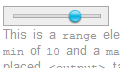 |
 |
 |
 |
 |
| Mac | Not Applicable |  |
 |
 |
 |
| Linux | Not Applicable |  |
Not Applicable |  |
 |
output tag can be used to show the value of a field,
or the result of an operation performed on a number of fields, using
JavaScript expressions. Although the output tag may calculate fomulas referencing any form fields, it is useful especially for the range input type so users can see what value the range element is pointing to:The contents of the
output tag is the default value. Note the this.value
syntax – I am not sure why the W3C HTML5 working group decided it was
needed (why not just have the formula?), but it is. If there are other
types of expressions supported in the final specification, they are not
supported by html5Widgets at this time. Note that in order to apply CSS to the output tag in IE, it is necessary to use Remy Sharp’s HTML5 Enabling Script.See an example of the
range input being used with the output tag.See an example of the
output tag being used without a range field.Update (May 12. 2011):
Since this article was written, theonforminput event has been deprecated in favor of the oninput. I have updated html5Widgets to support oninput, and have written article about its oninput support. I encourage you to see the different between the above to examples and the oninput method of using the output tag with range and without range
The datetime, datetime-local, date, week and week Input Types
At the time of this writing, Opera is the only desktop browser that
supports HTML5 date fields. To support the other browsers, html5Widgets
uses a slightly modified version of DynArch.com‘s Ex-”Coolest” DHTML Calendar (I decided not to use the coolest one because the Ex-Coolest has a more permissive license and it works really well). Now all browsers can support the datetime, datetime-local, date, month and week input fields, and submit these values in a consistent format.Here are the scripts needed for the browsers that need it:
Note that the calendar widget uses language packs and that I am using the English one (
calendar-en.js. Other language packs are included.Below is a comparison between Opera’s native date widget vs. the one provided by the DynArch/HTML5Widget combo:
| DateTime Widget | Month Widget | |
|---|---|---|
| Opera Windows |  |
 |
| Opera Mac |  |
 |
| Firefox 3.5+ Windows (html5Widgets support) |
 |
 |
The display formats, and they values that they submit to the server, are pretty much the same
| Input type | Format displayed on page | Format sent to server |
|---|---|---|
| datetime | yyyy-mm-dd HH:MM | yyyy-mm-ddTHH:MMZ |
| datetime-local | yyyy-mm-dd HH:MM | yyyy-mm-ddTHH:MM |
| date | yyyy-mm-dd | yyyy-mm-dd |
| month | yyyy-mm | yyyy-mm |
| week | yyyy-mmW | yyyy-mmW |
date widgets in action.Note: In this example, The Opera Mobile Windows Emulator incorrectly displays the
datetime and datetime-local calendars in the upper left-hand corner of the screen, but not the other ones. Since this is Opera’s own calendar widget, and not html5Widgets’, this bug will have to fixed by Opera. 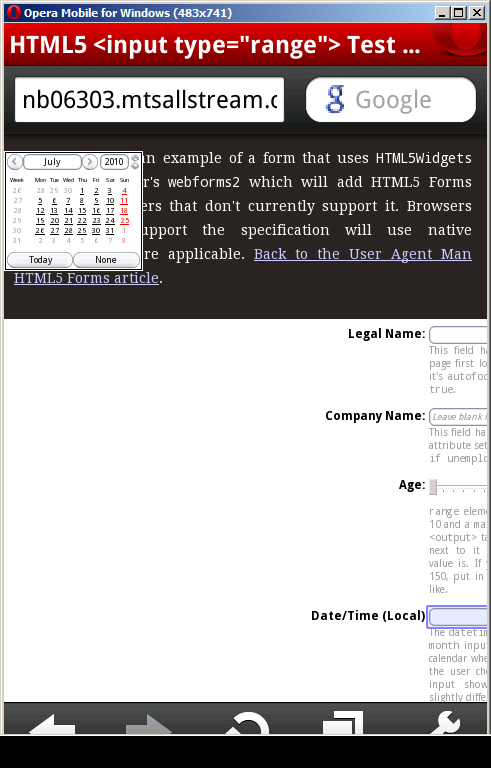
Screenshot of Opera Mobile bug
The color Input Type
Currently none of the desktop browser manufacturers support the color input type (although the new WebKit based Blackberry browser seems to have a neat implementation). While we wait to see how the major browser manufacturers decide to implement color, you can use html5Widgets’ implementation which uses Jan Odvarko‘s jscolor.
The script has been configured to allow only allow lower case
hexadecimal rgb values to be entered, and that a blank value not be
allowed, as per the W3C spec.Here are the script tags needed to implement this in all browsers:
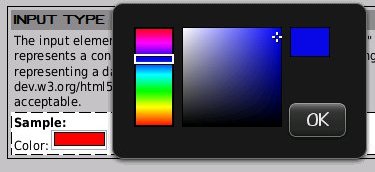
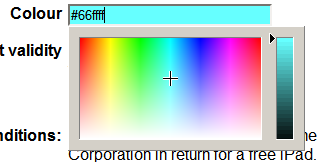
Below is a comparison between the Blackberry’s implementation (grabbed from the Blackberry Development Blog) and HTML5Widget/jscolor’s.
| Blackberry Web Browser | Firefox 3.5 with html5Widgets.js |
|---|---|
|
|
color input type.Note: Like other HTML syntax,
color
uses the unfortunate American spelling instead of the Queen’s Proper
English (i.e. colour). Ensure you spell it incorrectly in order to make
this work. ;-)How Well Do These Libraries Handle the Official Specification?
I have done some testing on some existing examples that use HTML5 forms to ensure that it works the way developers expect. Here are a few examples that I have taken, with the necessary JavaScript added:- A cool looking payment form by Inayaili de León (originally from her HTML5 forms tutorial)
- An HTML5 Form Demo by Richard Bradshaw (originally from his Fancy Forms: HTML5 + CSS3 – JS article)
- Another cool Example by Anne van Kesteren (originally from his article Improve your forms using HTML5! on the The Opera Developer Community Website).
webforms2 and html5Widgets libraries don’t implement everything … yet!!!!
Since I am really motivated with what HTML5 forms can do, I am
committed to completing support to most, if not all, of the HTML5 Forms
specification. The version of webforms2 in this blog post
has been modified from Weston Ruter’s original verison, but it will be
merged with the official Google Code version in the next week or so and
will include compressed versions of all the library. The html5Widgets library will also have a permanent home there.Things that I will be working on in the near future are:
- Support for other HTML5 form elements, among other things,
datalist,number,keygen,progress,timeandmeter - Support for CSS styling of HTML5 form widgets as well as the ability to style form fields according to their validation state (e.g.
:validand:invalidpsudo-classes). Opera seems to be the only browser currently supporting this. - Default styling for some of the new input types, like
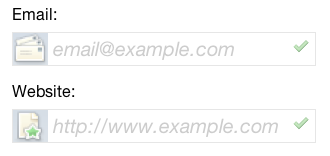
tel,email,url. Opera for Mac and Opera Mobile are the only browsers I know of that support this foremailandurl.
emailandurlform fields in Opera Mac - Support for customizing the validation look and feel. This is one I would love to do, since I’m sure a lot of developers would want to change how validation errors appear on the screen. Unfortunately, the HTML5 specification doesn’t describe a standard way of doing this. It will be interesting to see how the browser manufacturers deal with this issue (To any browser developer reading this is working on the display form validation errors: I would love to know how you are doing this if you are willing to share. Hint, HINT! ;-))
- In Internet Explorer 7 and lower, the ability to style input types it doesn’t support natively with CSS code like
input[type="range"] - Enabling HTML5 forms validation on the server side to ensure data integrity for browser that don’t support HTML5 forms that have JavaScript disabled.
- Support for internationalization of the error messages used in
webforms2. If anyone wants to help in the translation of these error messages, please drop me a line — I need help!
| Trident | Gecko | WebKit | Presto | |
|---|---|---|---|---|
| Attributes | ||||
autocomplete |
Yes | Yes | Yes | 2.0 |
list |
No | No | No | 2.0 |
required |
Yes (with webforms2) | Yes (with webforms2) | Yes (with webforms2) | 2.0 |
multiple |
No | 1.9.2 | 526 | No |
pattern |
Yes (with webforms2) | Yes (with webforms2) | Yes (with webforms2, and natively in Nightly build) | 2.0 |
min, max |
Yes (with webforms2) | Yes (with webforms2) | Yes (with webforms2) | 2.0 |
step |
Yes (with webforms2) | Yes (with webforms2) | Yes (with webforms2 and Nightly build natively) | 2.0 |
placeholder |
Yes (with webforms2) | 1.9.3 | Yes | Yes (with webforms2) |
form |
No | 1.9.3 | No | 2.0 |
autofocus |
Yes (with html5Widgets) | 1.9.3 | Yes (with html5Widgets and Nightly build natively) | 2.0 |
maxlength |
No | 1.9.3 | Nightly build | 2.0 |
novalidate |
No | No | Nightly build | No |
control |
No | 1.9.3 | No | No |
accept |
No | 1.9.3 | No | No |
formtarget |
No | No | No | No |
formaction |
No | No | No | No |
| Elements | ||||
datalist |
No | No | No | 2.0 |
keygen |
No | 1.0 | 125 | 1.0 |
output |
No | 1.9.3 | No | 2.0 |
progress |
No | No | Nightly build | No |
meter |
No | No | No | No |
| Input types | ||||
search |
No | 1.9.3 | 312 | No |
tel |
No | 1.9.3 | Nightly build | No |
url |
No | No | Nightly build | 2.0 |
email |
No | No | Nightly build | 2.0 |
datetime |
Yes (with html5Widgets) | Yes (with html5Widgets) | Yes (with html5Widgets and Nightly build natively) | 2.0 |
date |
||||
month |
||||
week |
||||
time |
||||
datetime-local |
||||
number |
No | No | Nightly build | 2.0 |
range |
Yes (with html5Widgets) | Yes (with html5Widgets) | Yes | 2.0 |
color |
Yes (with html5Widgets) | Yes (with html5Widgets) | Yes (with html5Widgets and Nightly build natively) | Yes (with html5Widgets) |
Integrating With visibleIf To Make Even Cooler Looking Forms
The webforms2 and html5Widgets libraries are designed to co-exist well with visibleIf to create interactive forms with fields that only validate the ones that visibleIf is displaying.See an example of HTML5 validation working with the
visibleIf JavaScript libraryAcknowledgments, Shout-outs and Kudos
- Faruk Ates and Paul Irish for the definitive HTML5 and CSS3 feature detector, modernizr.
- Weston Ruter for doing the insane amount of work on webforms2 years ago.
- Brian McAllister: for making the excellent Unobtrusive slider control which I used for the range element.
- Mihai Bazon for keeping the The Ex-“Coolest” DHTML Calendar around even though he has a paid product.
- Jan Odvárko for his rocking jscolor widget.
- Remy Sharp for his fine HTML5 Enabling Script so we can force IE to style things like the
outputtag. - Inayaili de Leon, Anne van Kesteren and Richard Bradshaw for allowing me to show how easy it is to make their original HTML5 Form demos work with html5Widgets.
Further Reading
- The W3C HTML5 Forms Specification Working Draft: The Working Draft is in “Last call for comments” status, so there may be some last minute changes.
- A Form of Madness: Chapter 10 of Mark Pilgrim’s great reference on HTML5.
- Web Forms 2.0 Working Draft: The WHATWG spec that the W3C spec is based on. It includes the repetition model which didn’t make it into the W3C spec
Download
This archive is the temporary home for
html5Widgets. It will soon be hosted at the webforms2 Google Code page.Both html5Widgets and webforms2 both have permanent homes at github (however, the html5Widgets github page contains a copy of webforms2 in it for your convenience). Weston Ruter has been kind to give me deciding rights over the destiny of this code. I will be updating webforms2 in the near future.
Download the latest version of html5Widgets, which includes webforms2, from github.


No comments:
Post a Comment